Find what's broken in your VPX / Popper pincab, and why.
Pincab Toolbox is a free scanner for Visual Pinball X and PinUP Popper installs. It lists every problem it finds, explains the cause in plain words and tells you what to check.
Covered: Visual Pinball X (10.x) and PinUP Popper. Not covered: Future Pinball, Pinball FX, Visual Pinball 9 and the other frontends (PinballX, PinballY).
Windows 10/11 · unzip & run · no accountVPX crashes · missing ROM · DMD gone dark · no backglass →
mm_109c.zip missing from the roms folder — the table will not start.dmddevice64.dll — external DMDs will not work.Scan complete — 2 critical, 5 warnings, 2 notes, 10 info.
Example of a scan result on demo data, redrawn in HTML (not a screenshot).
The real windows, annotated
Real screenshots of the app; only the numbered markers are added.
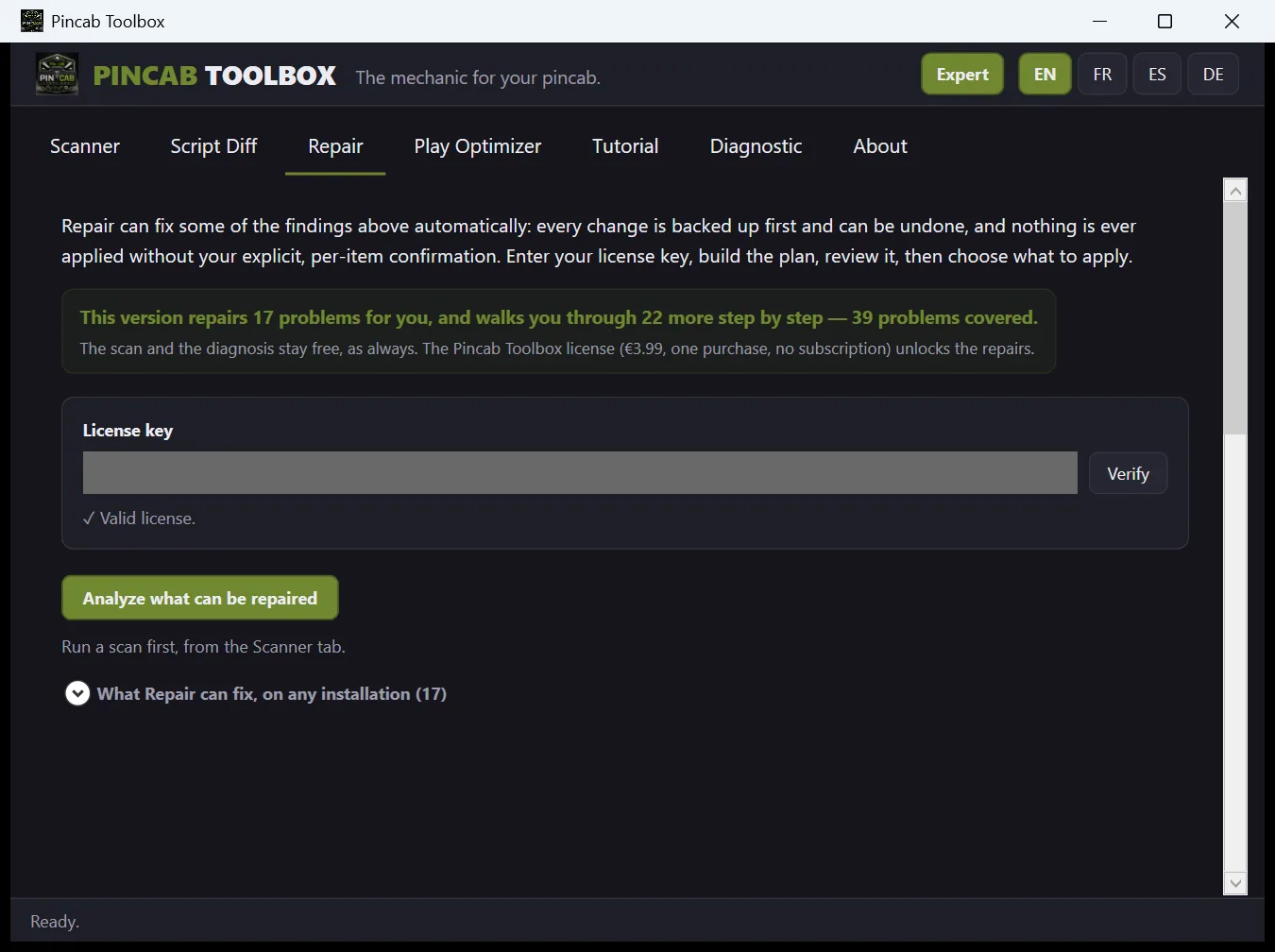
Repair, a plan you review first
- What the app says about Repair: every change is backed up first and can be undone, and nothing is applied without your confirmation, item by item.
- This box says what this version covers. The scan and the diagnosis stay free; the license unlocks the repairs (one purchase, no subscription).
- License key: only needed to apply repairs, never to scan.
- “Analyze what can be repaired” builds a plan. You read it, then choose what to apply.
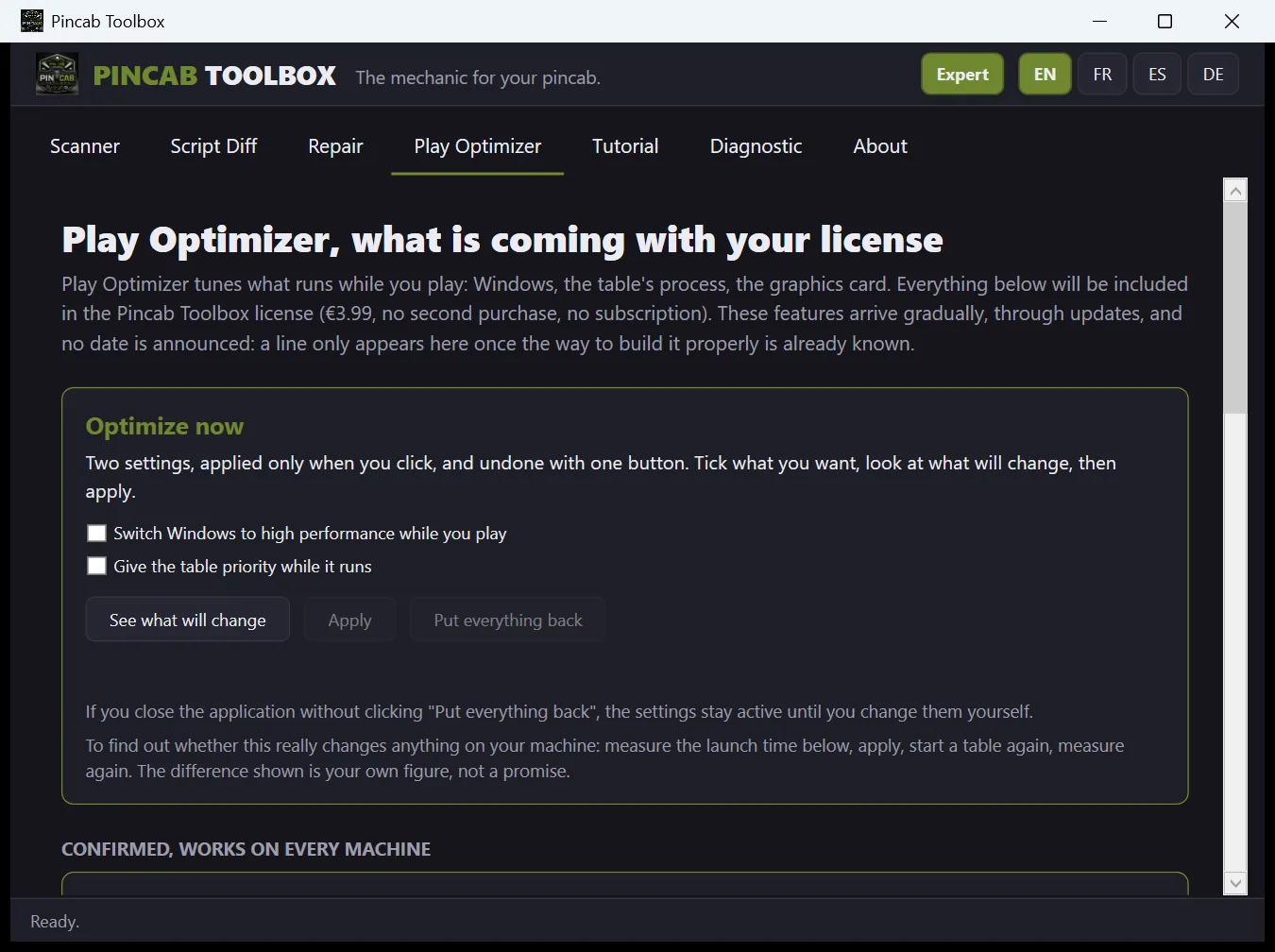
Play Optimizer, measured on your machine
- The page states what is included and what is still coming, and that no date is announced.
- Two settings are offered: Windows high performance while you play, and the table's priority while it runs. You tick only what you want.
- “See what will change” first, then “Apply”; “Put everything back” undoes it.
- No promise: the app asks you to measure the launch time before and after, and the difference shown is your own figure.
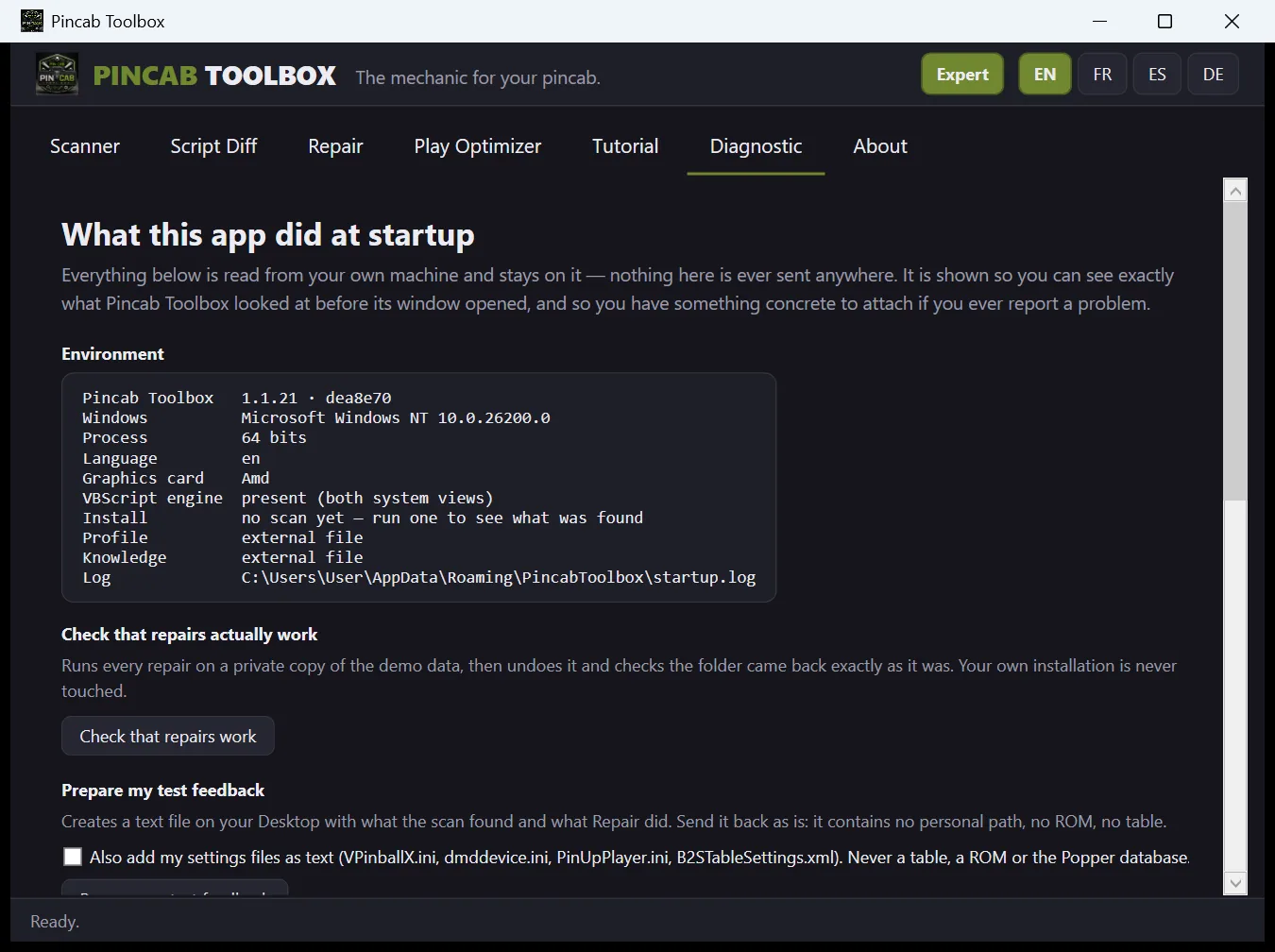
Diagnostic, what the app looked at
- The tab explains that everything shown is read from your own machine and is not sent anywhere; it is there so you can see what the app looked at when it started.
- The environment: app version, Windows, 32/64-bit process, language, graphics card, VBScript engine, and where the log file is.
- “Check that repairs work” runs every repair on a private copy of the demo data, undoes it and checks the folder came back identical. Your own installation is not touched.
- “Prepare my test feedback” writes a text file on your Desktop, to send as is: no personal path, no ROM, no table.
Sound familiar?
The four failures that break a pincab most often.
VPX crashes
A VPinMAME error on launch — usually a ROM the script can't find.
ROM Validator names the exact missing zipMissing ROM
The ROM is absent, misnamed, or needs a VPMAlias entry to resolve.
Alias resolution built inDMD stopped working
After the 64-bit update, VPX needs dmddevice64.dll — hybrids break silently.
Bitness Doctor flags every mismatchBackglass missing
No .directb2s, table not registered in Popper, or media misnamed.
Install Auditor checks all threeEvery problem the scanner can report, explained one by one: what it means, why it happens, how to check and fix it. Browse the problems →
EN · FR · ES · DE
What the free scanner checks
Nine modules, 55 checks, one scan, one clear report.
ROM Validator
Reads every VPX table script.
- Missing ROMs
- VPMAlias resolution
- Invalid / corrupt zip
Bitness Doctor
Inventories every DLL's bitness.
- 32/64-bit inventory
- Hybrid installs
- Missing dmddevice64.dll
Install Auditor
Cross-checks tables and PinUP Popper.
- Missing backglasses
- Tables not registered in Popper
- PUP-Packs
Compatibility Linter
Spots version and physics mismatches.
- nFozzy / Roth signatures
- Minimum VPX version
- Risky VBScript patterns
Update Watcher
Compares against the community index.
- Outdated tables
- Checked vs Virtual Pinball Spreadsheet
- Links only — never downloads
Dependencies & Security
Checks required plugins and blocked files.
- Windows-blocked DLLs (Mark of the Web)
- B2S Server / FlexDMD missing
- Flags what stops plugins loading
Script Diff
Compares two versions of a table.
- Side-by-side view
- Highlights changes
- Spot regressions fast
Display, DMD & Audio
Checks the screens, the DMD and the sound path.
- Screen layout and resolutions Popper can't parse
- DMD COM port declared but absent, dmddevice.ini mismatches
- Default audio device that looks like a screen output
- ALT Color and ALT Sound present but switched off
- Non-standard screen scaling (DPI)
System & processes
Catches the machine-level things that quietly break a cab.
- Zombie PinUP Display process still holding a screen
- NVRAM folder present but not writable — scores never save
- System decimal separator that can affect physics on some tables
- Free disk space, junctions and phantom config files
How it works
Four steps, no configuration.
Choose folder
Point it at your pincab install.
Scan
Runs on your PC, on your own files.
Read the report
Critical, warnings and info, sorted.
Play with confidence
Fix what matters, hit Start.
Latest versions
What each published version changed. Older changes are folded below.
- 1.1.21
September 28, 2026 - A table on VPinMAME's fallback controller with no game name no longer gets a false “ROM required” (fixed for Full House 1966 and Get Smart 2021, reported by a tester).
- New check: empty files (0 bytes) among .vpx tables, .directb2s backglasses and ROM zips are reported as a Warning.
- After a repaired copy is put in place, the texts warn about the “This file is corrupt” message VPX may show, and give the remedy: Ctrl+S in the VPX editor.
- 1.1.20
September 27, 2026 - New checkbox “I don't use a backglass” (off by default).
- Exports no longer include OK or ignored lines, and the counts are given at the top.
- Update findings compare only the same build (same authors, VR against VR) and stay silent when the file name and the table's page disagree.
- 1.1.19
September 24, 2026 - The app now offers a newer version at startup. It checks the file's SHA-256 fingerprint, runs a launch test before replacing anything, and keeps the previous version in a folder with a script to go back.
Earlier changes, up to September 22, 2026
What's new
Repair now has 17 automatic fixes and 22 step-by-step procedures written for a beginner, in all four languages. A quick check runs at startup and stays silent unless something is wrong. Plus a history of what changed, a Beginner/Expert mode, and the option to ignore results.
New Version 1.1.16: 13 new checks, silent when in doubt
I read the source code of Visual Pinball X, VPinMAME, B2S and the DMD driver, and PinUP's own help pages. When a setting can be a choice (game sound off, backglass disabled), the report says so instead of calling it a problem.
- Table scripts: controller.vbs, core.vbs or a system script missing, or scripts and VPinMAME older than what a table asks for
- Damaged ROM .zip, or a ROM zipped twice: the table list now says missing, not OK
- PuP-Packs: pack unzipped one folder too deep, B2S plugins off, PinUP screens at a negative position
- PinUP Popper: emulator folders, launch program or alternate VPX exe that are not on this PC, and games whose .vpx is gone
- Missing Visual C++ or DirectX files, UltraDMD not registered, table music missing
- Windows Filter Keys: holding the right flipper for eight seconds can turn it on, then flippers react late
- One folder per table (VPX 10.8.1): several versions side by side, and a ROM stored in the table's own pinmame\roms
- Tables kept in OneDrive are no longer downloaded by the scan: they are listed instead
New Four new repairs, each with its Undo button
Same safety net as every repair: nothing happens without your confirmation, a backup is made first, and Undo puts things back exactly as they were.
- Rename a backglass that is almost right to the table's exact name
- Turn a .7z or .rar ROM into the .zip VPinMAME needs, with the 7-Zip already on your PC (the original archive is kept)
- Turn off the Windows Sticky Keys shortcut, and nothing else
- Move your media to a second disk, back on: copy first, original kept, link created without admin rights
New Save your config, and a health sheet for your cab
Two new buttons after a scan. Neither changes anything on your cab.
- Save my config: one dated zip with your VPX, VPinMAME, B2S, DOF and Popper settings, before any update
- Cab health sheet: a one-page PDF with the score and what to fix first, handy when you sell or buy a cab
- Every report now starts with the version that made it, and says so if a newer one exists
- Unused PuP-Packs in PUPVideos are listed separately, carefully, and never moved
New Version 1.1.14: fewer false alarms, four new checks
I read the source code of B2S and Visual Pinball X instead of guessing, and watched hours of community tutorials. Each rule below comes from there.
- Backglass named after the ROM: no longer reported as missing, B2S does load it
- Backglass with almost the right name: the scan names the file and tells you what to rename it to
- Screen position file inside a table's own folder: now checked, in the same order as B2S
- A .vbs next to a table silently replaces its script: now reported
- Windows Sticky Keys shortcut: five quick left flips can open a Windows prompt mid-game, now reported
- Orphaned media: only real images, videos and sounds are counted now, no more .ini or PuP-Pack files (thanks to a tester report)
Guide My backglass doesn't show: 4 checks
In this order, before anything else. The scan checks each one for you wherever it can measure it.
- 1. The .directb2s has exactly the same name as the .vpx, in the same folder
- 2. The B2S Backglass Server is installed and registered
- 3. The backglass position (ScreenRes.txt or .res) is on a screen that is actually connected
- 4. The downloaded files are not blocked by Windows (right-click, Properties, Unblock)
New Only real issues make the list
Repair sorts every scan result automatically. Only real issues become steps to fix — items that are already fine never show up.
- Even on a cab with hundreds of scan results, the checklist shows only what needs attention
- "OK" and "Info" results stay out of the checklist
- Warnings, notes and critical issues all show up — nothing real is hidden
New See exactly what Repair changed
Every repaired item keeps a record of exactly what changed — the action, and the before/after values — right in the Repaired history, in your language.
- Each repaired item shows its before and after, in your language
- Know exactly what a past repair did, at a glance
- Falls back to the plain filename if a specific action has no description yet
New Beginner / Expert mode
A new switch next to the language buttons controls how much technical detail you see on each result.
- Expert: full technical breakdown — impact, cause, explanation, verification
- Beginner: just the plain-language symptom and the fix
- Switch anytime — your choice is remembered next time you open the app
New Two new automatic fixes
Repair fixes an off-screen DMD window and an unregistered or mismatched COM component, both with your confirmation first.
- DMD window stuck off every monitor? One click puts it back on-screen, fully reversible
- VPinMAME, B2S or FlexDMD not registered? Repair launches the right tool for you
- Both go through the same backup-and-confirm safety net as every other fix
New More accurate COM checks
The COM Registration Health check no longer raises a false alarm on a normal .NET component, and scanning a whole drive no longer mistakes the app's own demo data for a real install.
- B2S Server and FlexDMD registered the standard .NET way are recognized correctly
- A whole-drive scan no longer reports the app's own bundled demo tables as part of your collection
- Both found and fixed thanks to tester reports — keep them coming
New Ignore what you don’t want to see again
Right-click any result to ignore it by code or by table. It stops counting against your score, but it never disappears — a small badge marks it as ignored by you.
- Persists across app updates — set it once, it stays
- Shows up in every export too — never silently hidden
- Ignored something 90+ days ago? A gentle reminder checks if it’s still relevant
New Snapshot your score, compare anytime
Take a snapshot before you start fixing things, then compare it to your current scan whenever you want — see exactly what got better, what appeared, what’s gone.
- One click to save a snapshot, one click to compare
- Shows your score before/after, plus what’s new and what’s fixed
- Never automatic — you decide when to compare, so it always means something
Also new: the app now speaks German too (alongside English, French and Spanish), and the free scanner checks one more thing — whether your DirectOutput (DOF) toys are configured for the ROMs you actually have installed.
Repair
Repair works today, and it is proven: on a test install, every fix was applied for real then undone, and the folder came back byte for byte identical. The license costs €3.99: one purchase, no subscription.
17 automatic fixes, including
- Unblock a Windows-blocked file
- Restore a ROM from its archive
- Quarantine orphaned media files
- Kill a zombie PinUP Display process
- Reposition an off-screen DMD window
- Register a missing or mismatched COM component (VPinMAME, B2S, FlexDMD)
- Neutralize a hard-coded path from another PC in a table’s script *
- Turn AltSound and AltColor back on when the pack is installed but muted
- Turn the on-screen DMD back on when it has been switched off
- Break a ROM alias loop that crashes VPinMAME
- Set aside an empty save file that stops a table from starting
- Move POPMedia and PUPVideos to a second disk when yours is full
And 22 it walks you through
Some things cannot be fixed for you — a file that must come from its author, a Windows setting, a download that failed. For those, Repair takes you by the hand instead.
- Written for someone who is not a developer: one step per line, in order
- The exact folder name, the exact button name — nothing left to guess
- In French, English, Spanish and German — a procedure you follow with your hands in the file explorer is not read in a foreign language
- A copy button, so you can take the steps with you to the cab
How it protects you
- Backup taken before the first write, every time
- You see every change before it happens — nothing is silent
- One click to undo, even after closing the app
- If a fix fails, it tells you the actual reason
- Re-run the same scan after repairing and compare your score
- Refuses to act while VPX or Popper is running
After payment, your key is shown on screen: paste it in the Repair tab of the app. Scanning and the diagnosis stay free.
Every fix is backed up before it runs and can be undone in one click. Everything Repair can't automate stays a manual step, with its own guidance right in the Scanner report — it never guesses.
* This one works differently on purpose: it reads your table and writes a brand-new repaired copy next to it — your original file is never opened for writing. If the copy isn’t right, just delete it; your table is exactly as it was.
What checks or fixes would actually save you time on your cab? Tell me on the forum thread or in a comment — I'm building this with the community.
Coming with the Repair license: Play Optimizer
Play Optimizer tunes what runs while you play: Windows, the table's process, the graphics card. Everything below is included in the €3.99 Repair license, with no second purchase and no subscription. These features arrive gradually, through updates, and no date is announced: a line only appears here once the way to build it properly is already known.
Confirmed, works on every machine
- Windows power plan. Switch the cabinet to high performance while you play, then put your original plan back exactly as it was. Reversible, and saved before anything changes.
- Table process priority. Give Visual Pinball or Future Pinball a higher priority while it runs, and hand it back on exit. Never the "real time" priority, which can freeze Windows.
- Visual Pinball settings. Read your VPX options and surface the ones that actually affect smoothness, with the expected effect in plain words: low, medium, high. Your files are backed up before anything is written.
In development, depends on your hardware
- Temperature and load monitoring. Show processor and graphics card temperature and load while you play, changing nothing. Which sensors are available depends on your motherboard and your graphics card.
- Graphics settings dedicated to the table. Apply a 3D profile that belongs to Visual Pinball alone, without touching the settings of your other software. NVIDIA cards first, Intel support being explored. AMD cards are not covered: AMD does not publish the information required; that gets stated plainly here rather than promising a setting that would never apply on your machine.
Being explored, nothing is promised
- Automatic mode while you play. Let Play Optimizer apply your settings when a table starts and put everything back when it closes, with nothing to do. Running it on demand stays available either way.
- Custom profiles. Pick setting by setting what you turn on, instead of applying a whole profile.
Three rules will not change: nothing is modified without a backup first and a way back, nothing is applied unless you asked for it, and no figure is claimed for a gain that has not been measured.
Before, and with Pincab Toolbox
Before
- The table won't start, or VPX closes. You spend hours on forums and old threads looking for the error.
- You try fixes one after the other, without knowing which file is really at fault.
- You hesitate to touch a setup that works for your other tables.
With Pincab Toolbox
- You scan your install and get the list of what is wrong.
- Each problem comes with its cause in plain words and what to check.
- Where Repair can fix it, it builds a plan you review and confirm item by item; otherwise you get a step-by-step procedure.
Why you can trust it
What the software does and does not do, as the app itself states it.
- On your PC
- The scan runs on your machine. Your cab, your files and your scan results are never uploaded. No telemetry, no account.
- What goes online
- At each start, the app asks this website (not GitHub) whether a newer version exists. Nothing about your cab, your tables or your results is sent, and you can turn the check off in settings.json (UpdateCheckAtStartup = false). During a scan, the public Virtual Pinball Spreadsheet table list is downloaded from GitHub, at most once every 24 hours.
- Your files
- The scan changes nothing on your install. One free button writes: “Restore from my backup (zip)”. It acts only after a preview and your Yes, and saves the current files first. Repair, the paid option, only applies what you confirm item by item.
- Backup and undo
- Before a repair that changes a file, a timestamped backup is made, and an Undo button puts the file back. The few repairs that act on Windows itself rather than on a file (registering a component, ending a frozen process) cannot be undone that way.
- Never provided
- It never downloads, includes or provides a ROM, a table or media. It works on the files you already have.
- Coverage and limits
- Covered: Visual Pinball X (10.x) and PinUP Popper. Not covered: Future Pinball, Pinball FX, Visual Pinball 9 and the other frontends (PinballX, PinballY). Provided as is: it cannot guarantee it detects every possible problem on your setup.
Frequently asked questions
The first things people ask.
Does it work with VPX 10.8?
Yes, it covers Visual Pinball X 10.x. Among other things it detects installs that mix 32-bit and 64-bit parts, a missing dmddevice64.dll, and tables that declare a newer minimum VPX version.
Does it support PinUP Popper?
Yes. It audits your Popper database: tables installed on disk but not registered, missing backglasses and PUP-Packs.
Does it modify my files?
The scan only reads and reports: it changes nothing on your install. Two things can write, both only after your Yes. The free “Restore from my backup (zip)” replaces files with those of a backup you made (and, to undo a restore, removes the files it had created), saving the current files first. Repair, the paid option, applies only what you confirm item by item, and makes a timestamped backup before a repair that changes a file.
Does it require administrator rights?
The app starts as a normal user, and the scan needs no administrator rights. A few fixes, like registering VPinMAME, can need them, and the problem page says so.
Does it support Future Pinball?
No. Covered: Visual Pinball X (10.x) and PinUP Popper. Not covered: Future Pinball, Pinball FX, Visual Pinball 9 and the other frontends (PinballX, PinballY).
Is it safe? Does it upload my files?
The scan runs on your PC and nothing about your cab, your tables or your scan results is ever sent. Two things go online: at each start the app asks this website (not GitHub) whether a newer version exists, and you can turn that check off in settings.json (UpdateCheckAtStartup = false); and during a scan the public Virtual Pinball Spreadsheet table list is downloaded from GitHub, at most once every 24 hours.
Can a booby-trapped link in a finding harm my cab?
The button on a finding only opens https links to a short list of community sites (this site, GitHub, the Virtual Pinball Spreadsheet, VPUniverse and VPForums). Any other link is only copied, never opened.
How do you know the ROM check is right?
Every time the code changes, the ROM detection is tested against 1367 real table scripts published by the community. Any change in what it detects is flagged, and I review it table by table. See the list
A table won't start and VPinMAME says a ROM is missing
VPinMAME cannot run this table's game until the ROM zip is in the roms folder. Details and steps →
What is a 32/64-bit mismatch?
Two parts of your installation are not the same generation. Details and steps →
Windows blocked a DLL, what does that mean?
Windows is preventing this file from loading. The table will not start. Details and steps →
My backglass doesn't show, why?
No backglass will show for this table on your backglass screen. Details and steps → This table's backglass is probably already there, under a slightly different name, so it doesn't show. Details and steps →
Windows blocks the file when I launch it
If Windows blocks the file on first launch, it is not a virus. It is an automatic warning that hits software without a paid signature. Windows can block each new version for a while, until it knows it: close the message and try again later. If it is still blocked, or if you would rather not run it, write to me, I answer.